Skip to content

Nextora / CRM audiences & campaigns

Turn interest
into a relationship.

This setup brings together
  • Campaigns
  • CRM
  • Forms & Documents
  • Tasks
View setup
Campaign/campaigns
Actual Nextora interface: Give the journey a considered next step.
Campaign Product screenshot
Actual Nextora interface: Give the journey a considered next step.
Actual campaign canvas · complete four-step draft · not activated or runCampaigns + CRM + Tasks
Audience in contextA visible sequenceReview before launch

A relevant message starts with the right people.

A list of email addresses tells only part of the story. Start with the company, source and lead details already in CRM. Give the follow-up a reason to matter.

Bring the intended audience into focus
Brand illustration Bring the intended audience into focus
Choose the audience

Start with the people you intend to reach.

A broad introduction is easy to write. A relevant one starts with knowing who is on the receiving end.

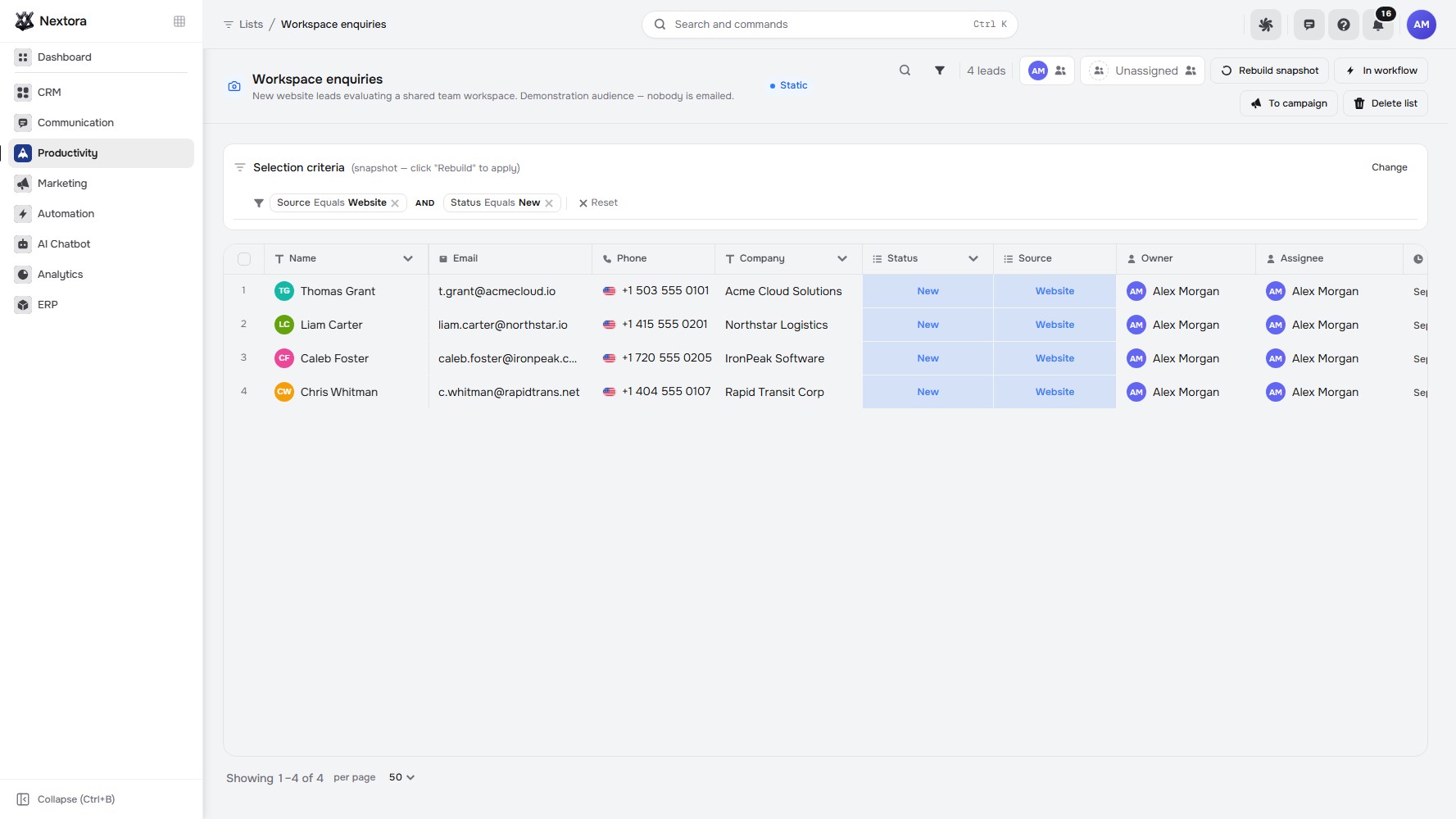
Use the audience criteria editor to outline Source equals Website, then inspect the lead records, companies and source details underneath.

  • Targeting criteria the team can inspect.
  • Customer context visible before outreach.
Audience/lists
Actual Nextora interface: Know who the message is for.
Audience Product screenshot
Actual Nextora interface: Know who the message is for.
Actual CRM list · three demonstration leads · audience criteria open, not savedCRM audiences

The audience becomes a set of recognisable CRM records that the team can discuss and check.

A considered product campaign image of a desk lamp in a quiet monochrome studio
Campaign creative · illustrative example

One clear message.
A considered next step.

A good introduction gives people something specific to consider. The campaign gives your team a plan for what comes after it.

Example campaign idea

A little more focus.
A little less noise.

Introduce the product. Give people time to explore. Plan a personal follow-up.
See how the sequence is prepared
Prepare the follow-up

See the whole follow-up before it starts.

An introduction needs a plan for what happens after the message, including where a person should take over.

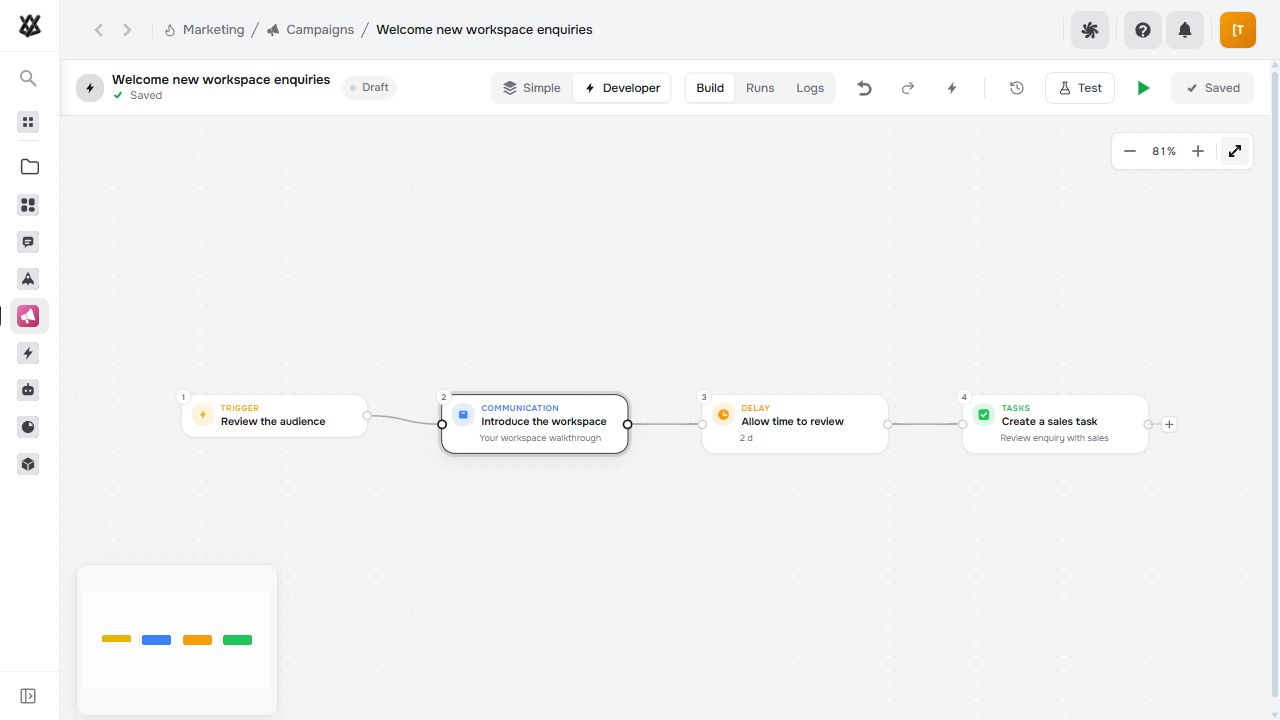
Review all four steps on the draft canvas: the audience entry point, an email introduction, a two-day wait and a sales task.

  • The message and its timing in one sequence.
  • The intended sales handoff visible from the start.
Campaign/campaigns
Actual Nextora interface: Give the journey a considered next step.
Campaign Product screenshot
Actual Nextora interface: Give the journey a considered next step.
Actual campaign canvas · complete four-step draft · not activated or runCampaigns + CRM + Tasks

Marketing and sales can review the same plan before the campaign is activated.

Review the handoff

Choose the people. Then choose their next workflow.

A prepared sequence still needs a deliberate decision about who should enter it.

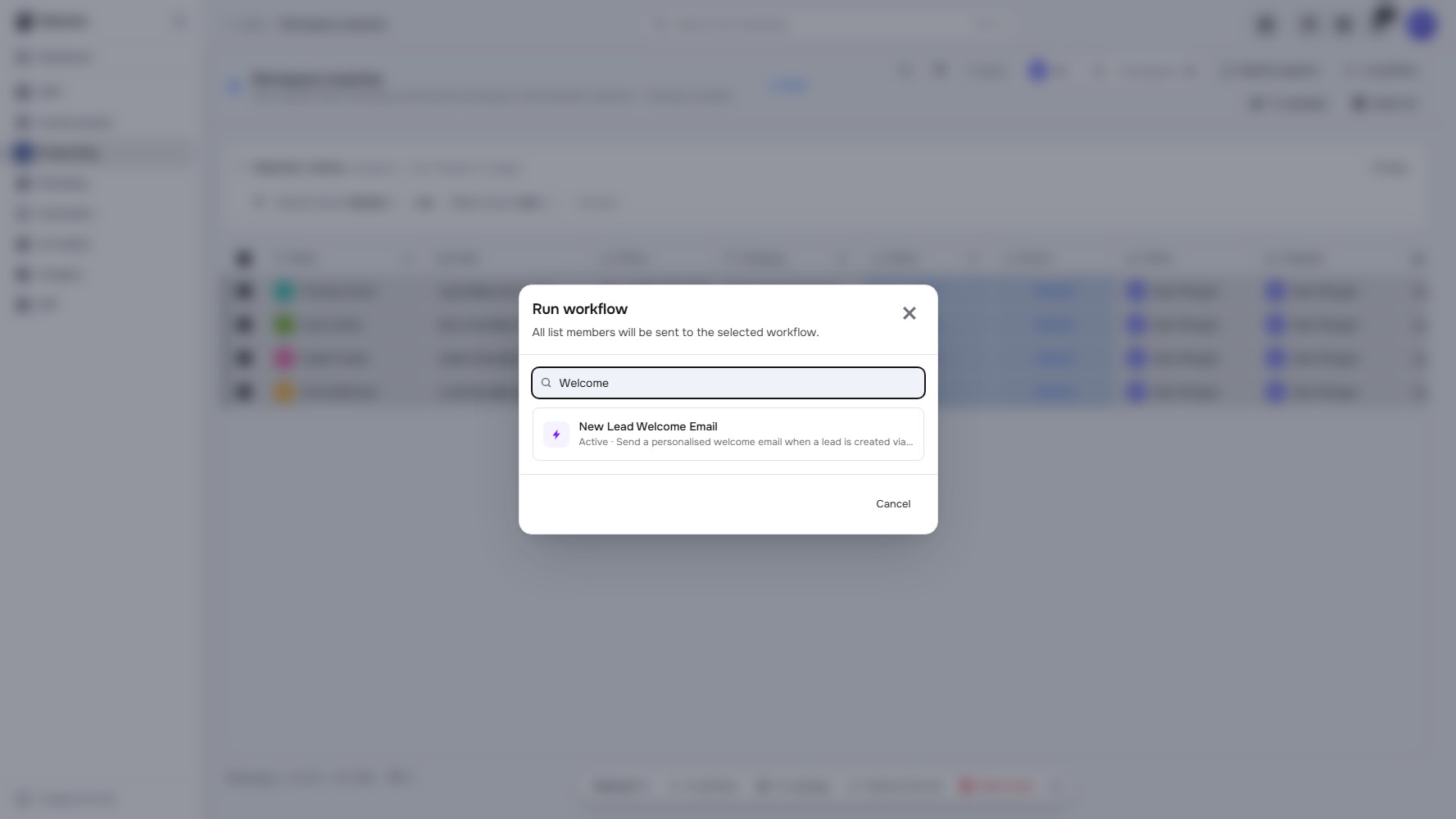
Select the intended CRM leads and open In workflow to find the campaign. Activate the workflow and configure its email channel before running it.

  • An explicit selection of CRM leads.
  • The intended workflow visible at the handoff.
Workflow handoff/lists
Actual Nextora interface: Choose the people. Then choose the workflow.
Workflow handoff Product screenshot
Actual Nextora interface: Choose the people. Then choose the workflow.
Actual workflow picker · three selected demo leads · no workflow selected or runCRM + Campaigns

The recipients and the sequence are clear before the follow-up begins.

The tools behind the work

Built around the way you work.

Explore every feature ↗

Build the campaign · Marketing + CRM

  • Dynamic & static lists · CRM
  • Audience criteria
  • Email campaigns
  • Waits & conditions
  • A/B splits
  • Email templates
  • Test runs & version history

Capture demand · Forms & Documents

  • Form builder
  • Conditional fields
  • Lead creation · with CRM
  • Form templates
  • Links, embeds & QR codes
  • Form conversion & field drop-off
  • Submission exports

Follow the response

  • Campaign reports
  • Recipient activity
  • Link clicks
  • Customer history · CRM
  • Sales follow-up · Tasks
  • Website bot widget · with AI Chatbot

The campaign ends.
The relationship continues.

Keep the audience, the sequence and the sales follow-up in the same workspace.

Your Nextora setup

Put marketing and sales in the same workspace.

CRM, Marketing and Tasks connect the audience, campaign sequence and intended follow-up. Forms & Documents adds enquiry capture to the same setup.

A shared foundation

Contacts, companies and workspace access are part of every setup. CRM adds the sales layer.

The setup shown here.

The journey shown connects a CRM audience, a campaign draft and the sales follow-up. Forms & Documents adds enquiry capture.

  • Campaigns

    Email sequences, audience journeys and campaign results.

  • CRM

    Leads, deals, pipelines and customer history.

  • Forms & Documents

    Lead capture forms, document templates and signing.

  • Tasks

    Task boards, owners, due dates and follow-ups.

Connect more when you need it
  • Conversations

    Handle customer replies in a shared queue.

  • Customer bots

    Add a customer-facing bot and website widget.

  • Analytics

    Add workspace reporting alongside the campaign’s own results.

Additional modules and access are agreed separately.

Discuss this setup

Private alpha · We’ll confirm the modules, connections and pricing for your workflow.

A few things to know.

Can forms create leads automatically?

With Forms & Documents and CRM connected, configure a form to create a lead. Add branding and conditional fields, then publish through a link, an embed or a QR code.

What kind of campaigns can we build?

Email campaigns use a visual chain of emails, waits, conditions and A/B splits. Test the flow before launch and review version history, recipient activity and campaign results.

How do we connect an audience to the next workflow?

Select the intended CRM leads, open the workflow picker and find the campaign you prepared. Activate its workflow and configure the email channel before running it.

Which modules support this journey?

The example uses Marketing for campaigns, CRM for leads and audience lists, and Tasks for the sales follow-up. Forms & Documents adds capture to this setup. Wider business workflows, customer bots and cross-team dashboards are separate extensions.

How do we evaluate it for our business?

Nextora is in private alpha. Bring a real audience and the channels you use; we will walk through the campaign sequence and the handoff to your sales team.